How Mobile Check Deposit Works Through Banking Apps
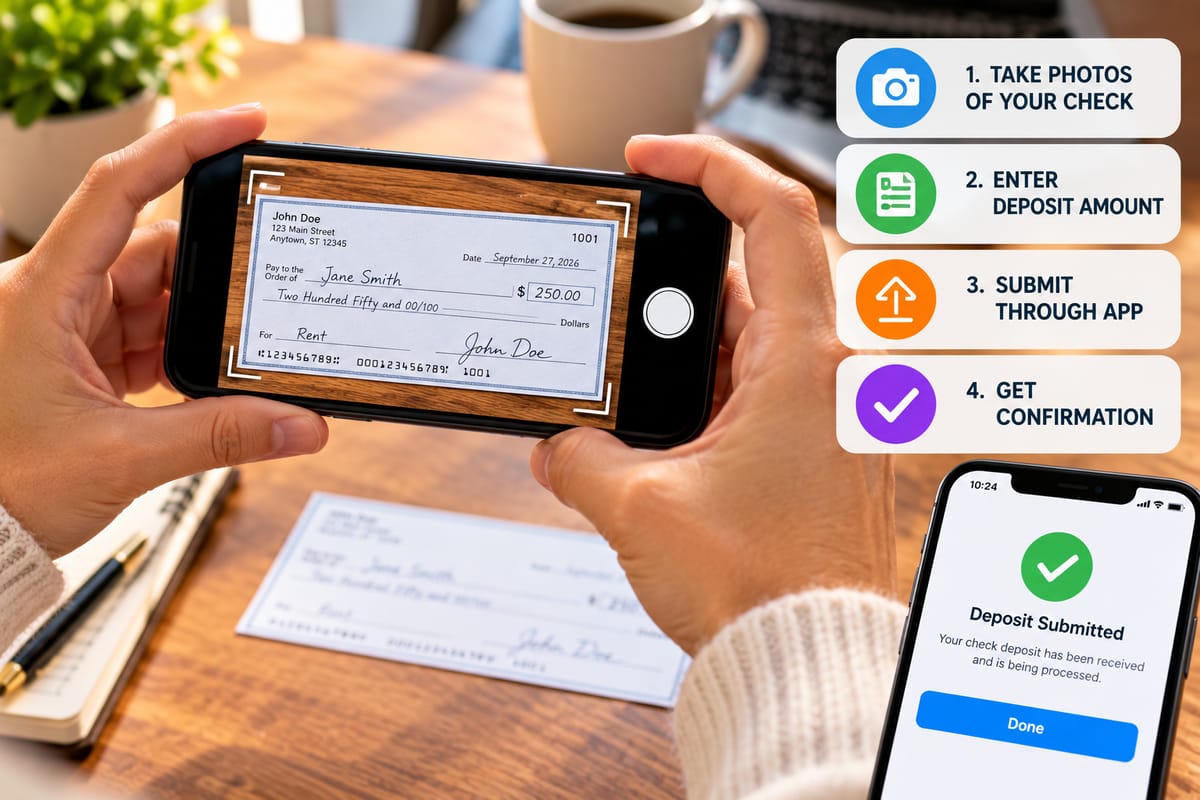
Mobile check deposit allows banking customers to deposit eligible paper checks by taking photographs with a smartphone or tablet instead of visiting a branch or ATM.
What looks like a simple process—photographing the front and back of a check and submitting the images through a banking app—involves several steps behind the scenes. The bank has to capture the check information, verify the deposit, process the transaction, and make the funds available according to its policies.
Understanding how mobile check deposit works can make the process easier to use and help customers avoid common mistakes.
What Is Mobile Check Deposit?
Mobile check deposit is a digital banking service that allows customers to submit a paper check electronically through a bank’s mobile application.
Instead of physically handing the check to a teller, the customer typically:
- Opens the bank’s mobile app.
- Selects the mobile deposit feature.
- Enters the deposit amount.
- Takes photographs of the check.
- Reviews and submits the deposit.
- Receives confirmation from the bank.
The physical check generally remains with the customer after submission until the bank’s retention instructions have been satisfied.
The exact process, eligibility requirements, and availability of funds vary between financial institutions.
How Mobile Check Deposit Fits Into Digital Banking
Mobile check deposit is one component of broader digital banking.
Digital banking allows customers to perform many traditional banking activities electronically, including checking balances, transferring money, paying bills, managing accounts, and depositing checks.
The How Digital Banking and Online Banking Work guide provides a broader look at how banking services operate through digital channels.
Mobile deposit extends this concept to paper checks by converting information from a physical check into an electronic deposit request.
What You Need to Use Mobile Check Deposit
Most mobile deposit systems require:
- An eligible bank account
- Access to the bank’s mobile app
- A supported smartphone or tablet
- A stable internet connection
- An eligible paper check
- Camera access for the banking application
Some banks may impose additional requirements.
For example, mobile deposit may only be available to certain account types or customers who meet specific eligibility criteria.
How to Prepare the Check
Before taking photographs, inspect the check carefully.
Make sure the check is:
- Payable to you or otherwise eligible for deposit
- Fully completed
- Legible
- Not visibly damaged
- Properly endorsed when required
Follow your bank’s instructions for endorsing the back of the check.
Some institutions require a specific endorsement statement for mobile deposits. Others may provide different instructions.
Following the bank’s exact requirements can help prevent processing problems.
How the Mobile App Captures the Check
The banking app uses your device’s camera to capture images of the check.
You will typically be asked to photograph:
- The front of the check
- The back of the check
The app may automatically detect the edges of the check and provide guidance for positioning it within the camera frame.
Some applications can also check whether the image is sufficiently clear before allowing the deposit to continue.
Why Image Quality Matters
The bank needs to be able to read important information from the check.
This can include:
- The amount
- Date
- Payee
- Routing information
- Account information
- Check number
- Endorsement
A blurry, dark, tilted, folded, or partially obscured image may prevent successful processing.
Place the check on a flat, contrasting surface and use adequate lighting.
Avoid shadows, glare, and reflections across the check.
Entering the Deposit Amount
The app usually asks you to enter the amount written on the check.
This information becomes part of the electronic deposit submission.
Take care when entering the amount because a typing mistake can create a discrepancy between the check image and the amount you submitted.
Some banking applications may use automated image recognition to read the check amount and compare it with your entry.
What Happens After You Submit the Deposit?
After submission, the bank receives the electronic images and associated information.
The bank may then perform various checks, which can include reviewing:
- The check images
- Account information
- Deposit amount
- Endorsement
- Deposit eligibility
- Potential duplicate deposits
- Other risk indicators
The precise verification process is determined by the financial institution and its processing systems.
A confirmation message generally indicates that the deposit request was received. It does not necessarily mean the funds are immediately available.
Why Banks Review Mobile Deposits
Banks have to manage the risk associated with accepting checks.
A check may be altered, duplicated, returned, or otherwise problematic.
Mobile deposit systems can therefore use automated and manual review processes to identify potentially unusual transactions.
Banks may consider factors such as the customer’s account history, deposit amount, check characteristics, and other risk signals when determining how a deposit should be processed.
What Does “Pending” Mean?
A mobile deposit may initially appear as pending.
This generally means the bank has received the deposit but has not yet completed the applicable processing steps or made all of the funds available.
The pending period can vary.
Customers should check the bank’s displayed availability information and applicable deposit terms rather than assuming that every mobile deposit becomes available immediately.
Why Funds May Not Be Available Immediately
Receiving a deposit confirmation and having usable funds are not always the same thing.
Banks may place holds on certain deposits or make funds available according to applicable policies and regulations.
Factors affecting availability can include:
- Deposit amount
- Account history
- Type of check
- Timing of the deposit
- Bank policies
- Risk considerations
- Whether the deposit requires additional review
The mobile app may display an estimated availability date after submission.
Cutoff Times Can Matter
Banks may establish cutoff times for mobile deposits.
A check deposited before a particular cutoff may be processed differently from one submitted later in the day, on a weekend, or on a holiday.
Because cutoff rules differ between banks, customers should check their institution’s mobile-deposit terms.
The time shown in the app can also help clarify when the deposit was officially submitted.
What Happens to the Physical Check?
After submitting a check electronically, do not immediately destroy it.
Banks generally provide instructions about how long customers should retain the original check and what to do with it afterward.
A common practice is to keep the check in a secure location for the period specified by the bank and mark it as deposited to reduce the risk of accidentally depositing it again.
Always follow the institution’s instructions.
Why Duplicate Deposits Are a Problem
Depositing the same check more than once can create a duplicate transaction.
For example, someone might submit a check through mobile deposit and later forget that it was already deposited before attempting to deposit it at a branch.
Banks use systems designed to detect duplicate deposits, but customers should also keep track of submitted checks.
Marking a check as deposited and storing it separately can help prevent accidental resubmission.
Mobile Deposit Limits
Banks may place limits on how much customers can deposit through the mobile app.
Limits can apply to:
- Individual deposits
- Daily deposits
- Monthly deposits
- Number of checks
- Specific account types
The limits may differ between customers and financial institutions.
If a check exceeds the mobile deposit limit, the bank may provide another deposit method.
Why Some Checks Cannot Be Deposited Through Mobile Apps
Not every check is necessarily eligible for mobile deposit.
Restrictions can apply to certain types of checks, including some:
- Foreign checks
- Damaged checks
- Checks with unclear information
- Checks payable in ways that do not meet the bank’s requirements
- Previously deposited checks
- Checks with endorsement problems
- Items prohibited under the bank’s mobile deposit agreement
The bank’s terms should be treated as the final authority on eligibility.
Security Features in Mobile Deposit
Mobile banking applications use security measures to protect customer accounts and transactions.
Depending on the bank and application, these can include:
- Passwords
- Multi-factor authentication
- Device verification
- Encryption
- Session controls
- Transaction monitoring
- Fraud detection
- Biometric authentication
Mobile deposit is connected to the customer’s bank account, so protecting access to the mobile device and banking application is important.
Protect Your Phone and Banking App
Mobile check deposit makes banking more convenient, but it also means financial activity can be conducted through a personal device.
Use basic security practices such as:
- Keeping the operating system updated
- Updating the banking application
- Using a strong device passcode
- Enabling available biometric authentication
- Avoiding suspicious applications
- Not sharing banking credentials
- Using caution on unsecured networks
- Locking the device when not in use
These practices help protect more than mobile deposits. They also protect other financial information stored or accessed through the device.
How Financial Apps Support Mobile Deposits
Mobile deposit is one example of how financial institutions have incorporated traditional financial services into smartphone applications.
Modern financial apps can provide access to:
- Account balances
- Transaction histories
- Transfers
- Bill payments
- Mobile deposits
- Card controls
- Alerts
- Budgeting features
- Financial management tools
The Complete Guide to Financial Apps explores the wider range of functions these applications can provide.
How the Deposit Connects to the Banking System
A mobile deposit does not simply transfer money directly from the check writer’s account to your account when you take a photograph.
The check information enters a broader financial processing system.
The bank receiving the deposit processes the check and communicates through established banking and payment networks to facilitate settlement.
This is part of the larger system through which money and payment instructions move between financial institutions.
The How Payment Systems Work and How Money Moves Between Accounts guide explains the broader mechanics of payment movement.
Mobile Check Deposit vs. Branch Deposit
Mobile deposit and branch deposit can accomplish the same basic objective, but the experience is different.
Mobile Deposit
Advantages may include:
- Convenience
- No branch visit
- Ability to deposit outside branch hours
- Faster submission
- Useful for people who travel or live far from branches
Potential limitations may include:
- Deposit limits
- Image-quality requirements
- Eligibility restrictions
- Processing delays
- Technology requirements
Branch Deposit
A branch deposit can provide:
- Direct assistance from staff
- Immediate confirmation from a teller
- Access to services unavailable through the app
- A physical location for resolving certain issues
However, branch deposits require traveling to a physical location and may depend on branch hours.
Mobile Check Deposit vs. ATM Deposit
Some banks also allow customers to deposit checks through ATMs.
ATM deposits can eliminate the need to visit a teller but still require traveling to a suitable machine.
Mobile deposit can be more convenient for customers who have a compatible smartphone and eligible account.
The best option depends on the customer’s circumstances and the services offered by the bank.
Common Mobile Deposit Problems
Several issues can prevent a deposit from being accepted.
Common problems include:
- Blurry images
- Poor lighting
- Missing endorsements
- Incorrect amounts
- Unsupported check types
- Damaged checks
- Exceeding deposit limits
- Technical problems with the app
- Network interruptions
- Incorrect account selection
Reading the app’s error message carefully can often indicate what needs to be corrected.
What to Do If a Deposit Is Rejected
If a mobile deposit is rejected, check the reason provided by the bank.
You may need to:
- Review the check.
- Confirm the endorsement.
- Retake clearer images.
- Verify the entered amount.
- Check whether the item is eligible.
- Contact the bank if the reason is unclear.
Do not repeatedly submit a problematic check without understanding why it was rejected.
What Happens if a Deposited Check Is Returned?
A check that initially appears to have been deposited can later be returned.
This can happen for reasons such as insufficient funds, account problems, or other issues involving the check.
If a deposited check is returned, the bank may reverse the corresponding credit and potentially charge applicable fees.
This is one reason customers should not assume that a displayed balance increase means the transaction is permanently settled.
Keep Track of Deposits
Maintaining a basic record of mobile deposits can make account management easier.
For each deposit, consider recording:
- Date
- Amount
- Check issuer
- Deposit confirmation
- Expected availability date
The banking app will usually retain transaction information, but personal records can provide an additional reference.
Mobile Deposit and Fraud Prevention
Banks use various systems to identify potentially fraudulent transactions.
Customers can also help protect themselves by avoiding deposits involving suspicious checks.
Be cautious if someone:
- Sends you a check unexpectedly
- Asks you to deposit a check and return part of the money
- Offers payment far above an agreed amount
- Pressures you to act quickly
- Claims that you must forward money after depositing a check
Unexpected checks connected to requests to send money elsewhere can be associated with scams.
If something seems suspicious, contact your financial institution before moving or spending the funds.
Why Banks Offer Mobile Check Deposit
Mobile deposit can benefit banks as well as customers.
Digital deposits can reduce reliance on physical branch transactions and allow financial institutions to provide services through their mobile platforms.
Mobile banking can also make routine transactions more convenient for customers, potentially changing how often they use traditional branches.
Banks generate revenue through multiple activities, including interest, fees, and financial services. The broader business model is discussed in How Banks Make Money From Interest, Fees and Financial Services.
Mobile Banking Does Not Eliminate Traditional Banking
Mobile check deposit is convenient, but traditional banking services remain important.
Some situations may still require:
- A branch visit
- An ATM
- Customer-service assistance
- Additional identity verification
- Specialized account services
- Physical documentation
Digital banking is best understood as another channel through which banking services can be accessed.
Tips for Successful Mobile Check Deposits
A few habits can make the process smoother:
- Use good lighting.
- Place the check on a flat surface.
- Make sure all four corners are visible.
- Keep the camera steady.
- Follow endorsement instructions exactly.
- Enter the correct amount.
- Confirm that the selected account is correct.
- Review the deposit before submitting it.
- Save the confirmation.
- Keep the original check according to the bank’s instructions.
These steps can reduce common errors.
A Simple Mobile Deposit Process
For most eligible checks, the process can be summarized as follows:
- Confirm that the check is eligible.
- Endorse it according to the bank’s instructions.
- Open the official banking app.
- Select mobile check deposit.
- Choose the account receiving the funds.
- Enter the check amount.
- Photograph the front and back.
- Review the images.
- Submit the deposit.
- Save the confirmation.
- Store the physical check securely.
- Monitor the account for final processing.
The exact screens and instructions will vary between banking applications.
Understanding the Convenience of Mobile Deposit
Mobile check deposit transforms a physical payment instrument into an electronic deposit request that can be submitted through a smartphone.
The process combines camera technology, mobile software, banking systems, transaction verification, and established payment infrastructure.
For customers, the visible process is simple: photograph, enter, review, and submit. Behind that simple experience, the bank must verify the deposit, manage fraud and duplicate-deposit risks, process the check, and determine when funds can be made available.
Understanding those steps helps explain why a mobile deposit can be convenient without necessarily being instantaneous. Used according to the bank’s requirements, mobile check deposit can provide a practical way to handle eligible paper checks without making a trip to a branch.