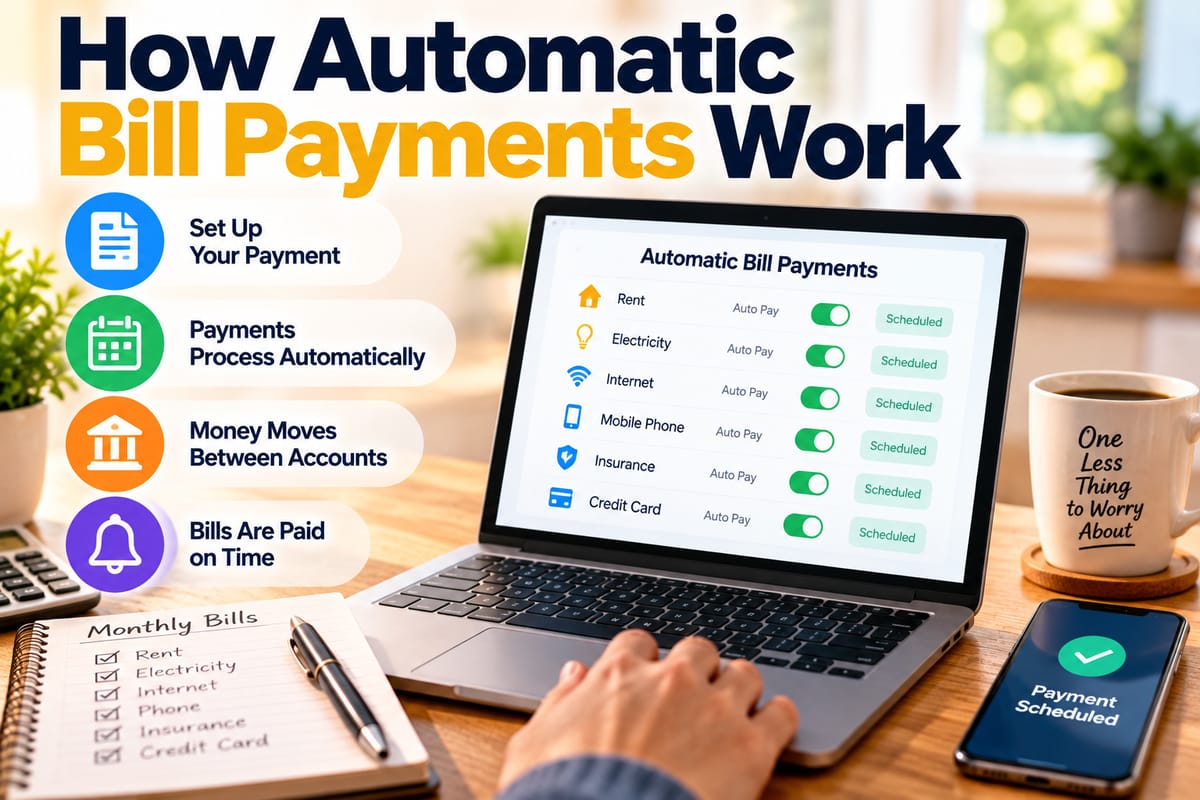
How Automatic Bill Payments Work
Automatic bill payments allow people to schedule recurring payments so that money is transferred to a biller or service provider without requiring a new manual payment every month. They can simplify household finances, reduce the risk of forgetting recurring bills, and make monthly expenses easier to organize.
Behind the convenience, however, several steps take place between the customer’s bank account, the payment provider, and the company receiving the money.
Understanding how automatic bill payments work can help consumers choose appropriate payment methods, monitor their accounts, avoid overdrafts, and recognize what happens when a scheduled payment fails.
What Are Automatic Bill Payments?
An automatic bill payment is a payment arrangement in which a recurring bill is paid according to a predetermined schedule.
Depending on the arrangement, the payment may be initiated by:
- The customer’s bank
- A credit card company
- The biller
- A payment service
- A financial application
The customer generally provides authorization and payment information, after which the system handles future payments according to the agreed instructions.
Automatic payments are commonly used for:
- Electricity
- Water
- Internet
- Mobile phone service
- Insurance
- Streaming services
- Loans
- Credit card bills
- Subscriptions
- Rent and other recurring expenses
How Automatic Bill Payments Work
The basic process is relatively straightforward.
A typical automatic payment involves:
Customer → Payment authorization → Payment system → Biller → Payment confirmation
The customer first authorizes the recurring payment and provides the necessary account information.
When the scheduled payment date arrives, the relevant financial institution or payment provider initiates the transaction. The funds are then processed through the appropriate payment network before being credited to the biller’s account.
The exact process depends on whether the payment is initiated by the bank, the biller, or another service.
Setting Up an Automatic Payment
Setting up automatic bill payment usually requires several pieces of information.
A customer may need to provide:
- Biller name
- Account number
- Payment amount or payment limit
- Payment frequency
- Payment date
- Bank account information
- Debit or credit card information
Some billers also allow customers to select whether the payment should cover the full balance, a minimum amount, or a predetermined amount.
Before activating an automatic payment, customers should review the terms carefully so they understand when money will be withdrawn and how the amount is determined.
Bank-Based Automatic Payments
One common method is to arrange recurring payments through a bank.
The customer can typically log into online banking, select the biller, enter the required details, and establish a recurring schedule.
The bank then initiates the payment according to those instructions.
For a broader understanding of everyday banking relationships and account features, see the Complete Guide to Checking Accounts and Everyday Banking.
Bank-based bill payments can be useful because they allow multiple recurring expenses to be managed from one financial account.
Biller-Initiated Automatic Payments
Another arrangement allows the company providing the service to initiate the payment.
For example, a customer may authorize an insurance company to automatically withdraw the monthly premium from a bank account.
In this arrangement, the biller generally sends a payment request according to the customer’s agreement.
This method can be convenient for bills that change from month to month because the provider can collect the amount that is actually due.
Fixed Automatic Payments
Some recurring expenses have predictable amounts.
A customer may authorize a fixed payment such as:
- $50 per month
- $100 per month
- A specific subscription price
- A regular loan installment
The same amount is then scheduled repeatedly unless the customer changes or cancels the arrangement.
Fixed payments are relatively easy to budget because the amount is predictable.
Variable Automatic Payments
Other bills change from month to month.
Examples include:
- Electricity
- Water
- Mobile usage
- Credit card balances
- Variable insurance premiums
An automatic payment can be configured to pay the amount due rather than a fixed amount.
Variable payments require more account monitoring because the withdrawal can change significantly between billing cycles.
How Payment Networks Process Automatic Bills
Automatic bill payments rely on financial infrastructure that connects banks, payment providers, businesses, and customers.
The How Payment Systems Work and How Money Moves Between Accounts guide explains the broader systems that allow financial institutions and payment providers to transfer funds.
When an automatic payment is initiated, the transaction must travel through the relevant payment infrastructure before the recipient receives the funds.
The customer may see only a single transaction in their banking application, but multiple processing steps can occur behind the scenes.
Digital Bank Transfers and Automatic Payments
Modern banking systems allow many payments to be initiated electronically.
Digital payment instructions can move between financial institutions without customers having to visit a branch or manually initiate each transaction.
The How Digital Bank Transfers Move Money Between Accounts guide provides additional information about how electronic transfers move funds between accounts.
Automatic bill payments use similar financial infrastructure, although the specific process depends on the payment method and participating institutions.
When Does the Money Leave the Account?
The timing depends on the payment arrangement.
A payment may be withdrawn:
- On the scheduled date
- Several days before the bill’s due date
- When the biller submits the payment request
- According to a processing schedule established by the bank or provider
Customers should check the terms of their automatic payment rather than assuming that the withdrawal will always occur at the exact time or date shown on the bill.
Why Payment Timing Matters
Payment timing matters because money must be available when the transaction is processed.
Suppose a customer schedules an automatic payment for the 15th of every month but receives their paycheck on the 20th.
If the account balance is insufficient on the payment date, the transaction could be declined or create an overdraft depending on the account’s features and applicable policies.
A useful approach is to align recurring payments with expected income where possible while maintaining an appropriate account buffer.
What Happens if an Automatic Payment Fails?
Automatic payments can fail for several reasons.
Potential causes include:
- Insufficient funds
- Expired card
- Incorrect account information
- Closed account
- Bank restrictions
- Payment limits
- Technical problems
- Cancelled authorization
The consequences depend on the bill and payment provider.
A failed payment could result in:
- A late fee
- Service interruption
- Interest charges
- Returned-payment fees
- Additional collection activity
Customers should review failed payment notifications promptly and contact the appropriate provider when necessary.
Automatic Payments and Overdrafts
Automatic payments can make it easier to pay bills on time, but they can also create overdraft risks if the account does not contain enough money.
For example, a customer may have several automatic payments scheduled within the same week.
If unexpected expenses reduce the account balance, one or more scheduled payments could push the account below its available balance.
Keeping track of upcoming withdrawals is therefore important even when payments are automated.
Create a Bill Payment Calendar
Automation does not eliminate the need to understand when money is leaving the account.
A simple bill calendar can list:
| Bill | Payment date | Typical amount | Payment method |
|---|---|---|---|
| Electricity | 5th | Variable | Bank account |
| Internet | 10th | $60 | Automatic debit |
| Insurance | 15th | $120 | Bank account |
| Streaming | 20th | $15 | Card |
| Phone | 25th | $50 | Automatic debit |
The amounts and dates will vary from household to household.
The purpose of a bill calendar is to provide a clear view of upcoming withdrawals.
Automatic Payments and Household Budgeting
Automatic payments can work well as part of a broader household budgeting system.
The How to Manage Household Bills and Monthly Expenses guide explores ways to organize recurring expenses and manage monthly financial obligations.
When automatic payments are combined with a realistic budget, customers can anticipate recurring withdrawals rather than discovering them only after the money has left the account.
Keep Track of Variable Bills
Automatic payments for variable expenses require additional attention.
If an electricity bill normally ranges from $70 to $120 but rises to $200 during an unusually expensive month, an automatic withdrawal will generally reflect the amount authorized under the payment arrangement.
Customers should therefore review statements and billing notices regularly.
Automation should make payments easier, not make spending invisible.
Review Bank Statements Regularly
Checking bank statements remains important even when nearly every recurring expense is automated.
Reviewing transactions can help identify:
- Unexpected charges
- Duplicate payments
- Incorrect amounts
- Cancelled subscriptions that are still being billed
- Payments that were processed earlier or later than expected
- Unauthorized transactions
Regular monitoring also makes it easier to maintain an accurate household budget.
Automatic Payments for Subscriptions
Subscriptions are particularly well suited to recurring payment arrangements.
Examples include:
- Streaming platforms
- Software
- Cloud storage
- Memberships
- Digital publications
- Fitness services
The main challenge is that subscriptions can continue until they are cancelled.
A person may forget about a small recurring charge because the amount is deducted automatically each month.
Periodically reviewing recurring transactions can help identify services that are no longer being used.
What Happens When a Card Expires?
Automatic payments linked to debit or credit cards can be affected when the card expires or is replaced.
The payment may fail unless the updated card information is provided.
Some financial institutions or payment services may automatically update card details in certain circumstances, but customers should not assume this will always happen.
Reviewing recurring payments after receiving a replacement card can help prevent unnecessary disruptions.
Changing a Bank Account
Customers may also need to update automatic payments when switching bank accounts.
This can happen when someone:
- Changes banks
- Closes an old account
- Opens a new checking account
- Changes account numbers
- Moves recurring payments to another financial institution
A useful transition strategy is to identify every recurring payment connected to the old account and update each authorization before closing it.
Cancelling Automatic Payments
Automatic payments can generally be cancelled or changed through the bank, biller, or payment provider responsible for the arrangement.
The exact process varies.
Customers should verify:
- Whether the cancellation is immediate
- Whether another payment is already scheduled
- Whether the biller requires separate cancellation
- Whether a subscription remains active
- Whether a final payment is still due
Cancelling an automatic withdrawal does not necessarily cancel the underlying service or financial obligation.
For example, stopping an automatic payment for an internet service does not necessarily terminate the internet contract.
Automatic Payments and Credit Cards
Credit cards can also be used for recurring bills.
Using a credit card may provide benefits such as centralized transaction records or rewards, depending on the card and issuer.
However, customers should remember that an automatic charge to a credit card still creates a balance that must eventually be paid.
Automation does not eliminate the underlying financial obligation.
Automatic Payments and Security
Recurring payments involve sharing financial information with banks, businesses, or payment providers.
Customers should therefore:
- Use secure accounts
- Protect banking credentials
- Monitor transactions
- Avoid sharing account information unnecessarily
- Update passwords when appropriate
- Review unfamiliar charges
- Use trusted payment platforms
If an automatic payment appears that the customer did not authorize, the transaction should be reviewed promptly with the relevant financial institution or provider.
Keep a List of Recurring Payments
A recurring-payment list can make financial management much easier.
Record:
- Company name
- Amount
- Payment frequency
- Payment date
- Payment method
- Account used
- Cancellation requirements
This list can be updated whenever a new subscription or bill is added.
It can also be reviewed periodically to identify unnecessary recurring expenses.
Review Automatic Payments After Major Life Changes
Financial circumstances can change.
Automatic payment arrangements should be reviewed after events such as:
- Changing jobs
- Moving
- Opening or closing bank accounts
- Getting married
- Separating finances
- Starting a new loan
- Cancelling subscriptions
- Changing insurance
- Taking on new household expenses
A payment arrangement that made sense previously may no longer fit the household’s current budget.
The Benefits of Automating Bills
When used carefully, automatic payments can offer several practical advantages.
They can:
- Reduce the chance of forgetting recurring bills
- Save time
- Simplify monthly financial administration
- Make payment schedules more predictable
- Reduce the need to manually initiate every transaction
- Help maintain consistent payment routines
These benefits are particularly useful for predictable recurring expenses.
The Potential Drawbacks
Automation also creates risks when it is not monitored.
Potential problems include:
- Insufficient funds
- Forgotten subscriptions
- Unexpected variable bills
- Incorrect payment amounts
- Duplicate payments
- Outdated account information
- Continued payments after a service is no longer needed
The solution is not necessarily to avoid automation. Instead, it is to combine automation with regular financial monitoring.
A Simple Automatic Bill Payment Routine
A practical routine can involve four steps:
1. List Recurring Expenses
Write down every recurring bill and subscription.
2. Confirm Payment Details
Check the amount, frequency, payment date, and account being used.
3. Maintain Sufficient Funds
Make sure the payment account contains enough money to cover scheduled withdrawals.
4. Review Transactions
Check the account regularly to confirm that payments were processed correctly.
This keeps automation working as a financial convenience rather than allowing it to become something that operates without oversight.
When Automation Works Best
Automatic bill payments tend to work particularly well for predictable expenses with established payment schedules.
They can be especially convenient for:
- Rent
- Insurance
- Internet
- Phone service
- Streaming subscriptions
- Loan payments
- Regular utility bills
Variable expenses can also be automated, but they require closer monitoring because the payment amount may change.
Automation Should Not Mean Ignoring Your Accounts
Automatic bill payments are designed to remove repetitive tasks, not remove financial awareness.
Customers should still know:
- What bills are being paid
- How much is being withdrawn
- When payments occur
- Which account is being charged
- What happens if a payment fails
- How to cancel or modify an authorization
Understanding these details makes automation safer and more useful.
Making Automatic Bill Payments Work for Everyday Finances
Automatic bill payments work by combining customer authorization with financial systems that schedule, process, and deliver recurring payments. Depending on the arrangement, the bank, biller, card network, or payment provider may initiate the transaction.
The convenience comes from removing the need to manually make the same payment every month. The responsibility remains with the account holder to maintain sufficient funds, monitor transactions, update outdated information, and cancel services that are no longer needed.
Used as part of an organized household budgeting system, automatic payments can make recurring expenses easier to manage while reducing the administrative work involved in paying regular bills.